A boutique hotel can sell out a busy weekend weeks in advance and still leave revenue behind if its rates were set too low. On a quiet midweek night, the reverse can happen: a rate that does not reflect softer demand may leave rooms unsold. Both problems are harder to spot when a team relies on a static seasonal rate card or checks a spreadsheet only occasionally.
Hotel revenue software can help teams see changing demand and make more timely pricing decisions. But another dashboard is not enough. A useful system connects performance data, forecasts, market context and practical controls so the people responsible can understand and act on what they see. These are seven capabilities boutique and independent hotels should evaluate.
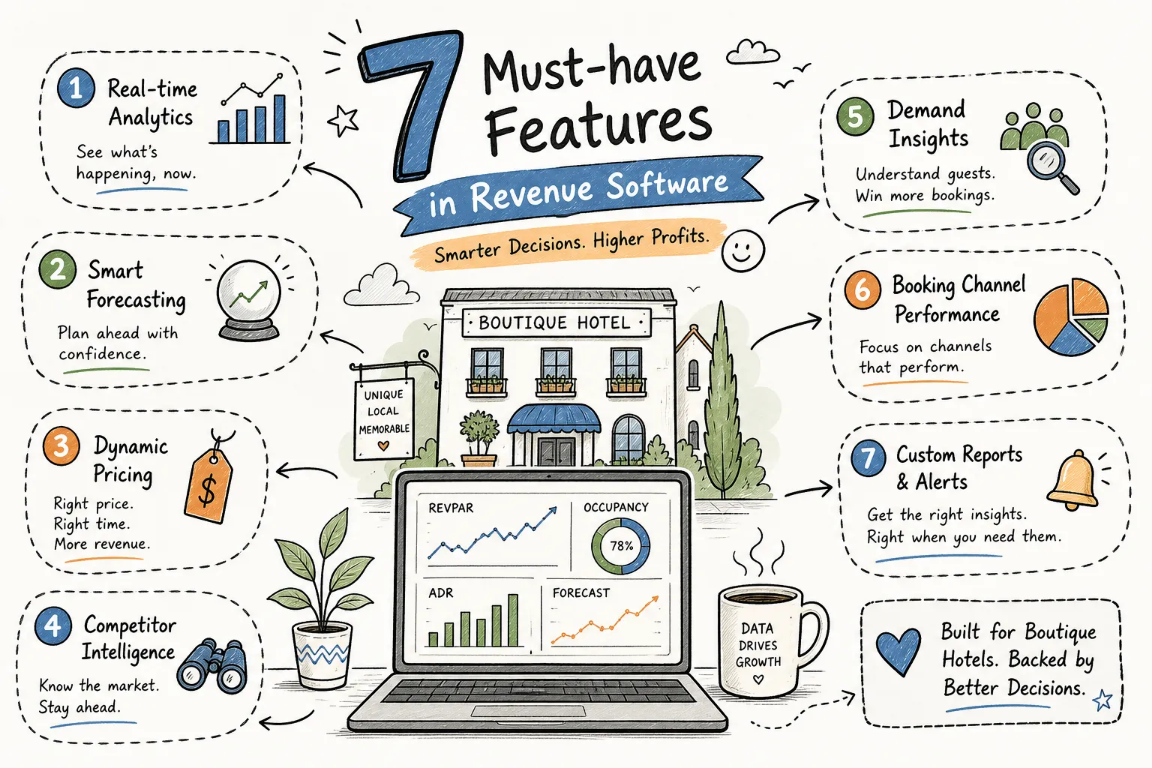
1. Real-time performance analytics
Start with a clear view of what is happening now. A revenue dashboard should make it easy to review occupancy, average daily rate (ADR), revenue per available room (RevPAR), booking pace and pickup for upcoming dates. Useful views let you compare performance with an appropriate prior period and break results down by room type or booking channel where the source data supports it.
Look for timely, clearly dated data rather than a polished chart with no indication of when it was refreshed. Ask whether the numbers come directly from your property management system (PMS), how cancellations and modifications are handled, and whether the dashboard distinguishes booked revenue from forecast revenue.
2. Smart demand forecasting
A forecast should help you look forward, not simply restate last month's occupancy. It can combine booking pace, historical patterns, lead time, seasonality and relevant market signals to show how demand may develop across future dates. The right horizon and level of detail depend on the property, its booking patterns and the quality of its historical data.
Ask how often forecasts refresh, whether they are shown by date and room type, and how the system explains changes since the previous forecast. Request a demonstration using your own historical data if possible. Treat accuracy percentages as claims to validate: ask how the metric was calculated, which properties and periods were included, and whether the result can be compared with a simple baseline.
3. Dynamic pricing with clear controls
Dynamic pricing uses changing demand and market signals to recommend or update rates for particular dates. The goal is not to change prices constantly or discount every unsold room. It is to make considered adjustments as the booking picture changes, while keeping the hotel's commercial strategy in control.
Check that pricing can be managed at the level your team needs, such as room type and stay date. Important safeguards include minimum and maximum rates, limits on how much a rate can move at once, date-level overrides and clear approval settings. Ask the vendor to show why a sample rate was recommended and what inputs affected it; a number without an understandable reason is difficult to trust.
4. Competitor intelligence
Competitor rate monitoring can add useful context to your own booking data. It helps a team see how a selected set of comparable properties is pricing the same dates and identify changes that may warrant a closer look. It should support a decision, not encourage you to copy another hotel's rate without considering your own demand, product and position.
Ask how the comparison set is selected and maintained, how often rates are checked, and whether comparisons account for differences in room type, cancellation terms, inclusions and availability. A rate that looks lower may not be a like-for-like offer. Confirm what the system can actually observe and how it labels unavailable or incomplete data.
5. Demand insights beyond occupancy
Occupancy is one signal, not the whole demand picture. Booking pace, lead time, length of stay, cancellations, event calendars and the mix of guest or booking segments can help explain why demand is changing. When these signals are presented with context, a revenue manager can distinguish a short-lived booking spike from a pattern that deserves a pricing response.
Find out which signals are measured directly and which are estimates or third-party inputs. Check whether the system shows the dates and assumptions behind an insight, and whether your team can relate it to its own booking history. Local events can matter, but they should be checked for relevance rather than treated as a guaranteed increase in demand.
6. Booking channel performance
Rates and inventory often pass between the PMS, a channel manager, online travel agencies (OTAs) and a hotel's direct booking channel. A revenue tool needs to fit that workflow. Two-way connectivity can matter: reservation and availability data may need to flow into the pricing process, while approved rate changes need to reach the connected systems correctly.
Ask which integrations are available for your exact software versions and configuration. During a demo, request a walkthrough of how a rate change is approved, transmitted and confirmed, and what happens if an update fails. Review channel mix and net revenue alongside gross room revenue, taking your own commission agreements and distribution costs into account. Do not assume that every product includes a booking engine or channel manager.
7. Custom reports and useful alerts
Reports should make it easier to share decisions and follow results, not create more manual work. Look for configurable date ranges, useful comparisons, export options and views suited to the people who use them, from the revenue team to owners and general managers.
Alerts are most helpful when they point to a specific exception, such as an unexpected change in pickup, a forecast shift or a rate outside a policy. Ask whether thresholds can be adjusted, who receives each alert and how the team can prevent notification overload. A practical alert tells you what changed and where to investigate next.
How to evaluate revenue software
Not every hotel needs every capability in one product. Some properties will prioritize forecasting and rate controls; others may first need to improve data flow between their PMS, channel manager and accounting tools. Direct booking tools, guest loyalty programs and accounting integrations can be valuable parts of a wider technology stack, but confirm whether each is included, integrated or sold separately.
Use a vendor demo to test the workflow, not just the presentation. Bring a few real dates: a busy period, a typical weeknight and a date where your current pricing is uncertain. Ask the vendor to show the source data, forecast, recommendation, guardrails, approval and downstream update for each case. Confirm implementation responsibilities, the full subscription and integration costs, support arrangements and the process for correcting bad data.
If you run a trial, record a baseline first. Track measures such as forecast error, time spent preparing rates, booking pace and RevPAR, and account for changes in season, events and channel mix. Results depend on the property, market, data quality and how the system is used; avoid relying on generic uplift promises as a substitute for evidence relevant to your hotel.
The best-fit revenue software makes decisions easier to understand and repeat. Begin with the operational problem you want to solve, then choose the features and integrations that address it without adding complexity your team cannot use.
Frequently asked questions
What does hotel revenue management software do?
It helps a hotel analyze performance and demand, forecast future bookings, and manage pricing decisions. Depending on the product, it may also connect with the PMS, channel manager, booking engine or reporting tools.
Is revenue software useful for a small or independent hotel?
It can be useful when manual reporting and rate updates take time or make it difficult to respond to changing demand. Evaluate the product against your property's data, workflows, integrations and budget rather than assuming that a larger platform is automatically a better fit.
What should I ask during a revenue software demo?
Ask the vendor to show a forecast and rate recommendation using a real date from your property, explain the inputs and safeguards, demonstrate the PMS and channel update flow, and provide the complete cost and implementation requirements.
Does a channel manager replace revenue management software?
Not necessarily. A channel manager distributes rates and availability across connected booking channels. Revenue management software focuses on analyzing demand and supporting pricing decisions. Some products combine capabilities, while others integrate with separate systems; confirm what is included in your proposed setup.